Case study · Services
Tech-O: the complete business software of a multi-branch water-leak detection network
Tech-O, a network of non-destructive water-leak detection companies with several branches in France, runs its business, from the customer request to payment, in complete business software built by C-Esium: customer and request management (CRM), quotes, invoicing and automatic reminders for unpaid invoices, accounting synchronised with Pennylane, payroll inputs, built-in customer SMS and email, a team calendar synchronised with Google Calendar, documents and PDF reports generated automatically, and job reports written by AI. Sales, scheduling, technicians, head office and accounting work in it every day, and Tech-O owns its software: its contract assigns to it all rights to the code.
According to an estimate made by C-Esium with Tech-O: more than 3,000 hours saved per year, 30% operational gains and 20% fewer human errors.
Who is Tech-O?
Tech-O is a network of non-destructive water-leak detection companies, rooted in rope-access work and organised as a franchise network, with branches in Saint-Étienne, Ambérieu-en-Bugey, Annecy, Limoges, Bourg-en-Bresse and the Lyon area (France). It is a services company.
To find out more about the company: tech-o.fr (in French).
- Business
- Non-destructive water-leak detection (services)
- Origins
- Rooted in rope-access work (hard-to-reach areas)
- Locations
- Lyon area, Saint-Étienne, Ambérieu-en-Bugey, Annecy, Limoges, Bourg-en-Bresse (France)
- Model
- Franchise network
- Software
- Complete business software built by C-Esium: CRM, quotes, invoicing and reminders, accounting synchronised with Pennylane, payroll inputs, SMS and email, calendar synchronised with Google Calendar, PDF documents, AI
- Software users
- Sales, scheduling, technicians, head office, accounting
- Software ownership
- Tech-O: its contract assigns to it all rights to the code
What was the challenge? One job, five roles
At Tech-O, every job goes through sales, scheduling, technicians, head office and accounting. In a multi-branch network, every handover is a place where information can be re-keyed, wait or get lost — and a job without a report is a job that is not invoiced.
- 01
Sales
The request comes in, the quote goes out, and it has to be followed up and chased.
- 02
Scheduling
The job has to be assigned to the right technician, in the right branch, and the appointment confirmed to the customer.
- 03
Technicians
The job takes place; it needs a complete report, linked to the right customer and the right address.
- 04
Head office
It needs to see, branch by branch, what has been done, what is missing and what is late.
- 05
Accounting
It has to invoice, track payments, chase unpaid invoices and pass everything on to accounting (Pennylane).
Hence the choice of a single tool for all these roles: information is entered once, when it is created, then follows the case from the request to payment.
What Tech-O’s software does
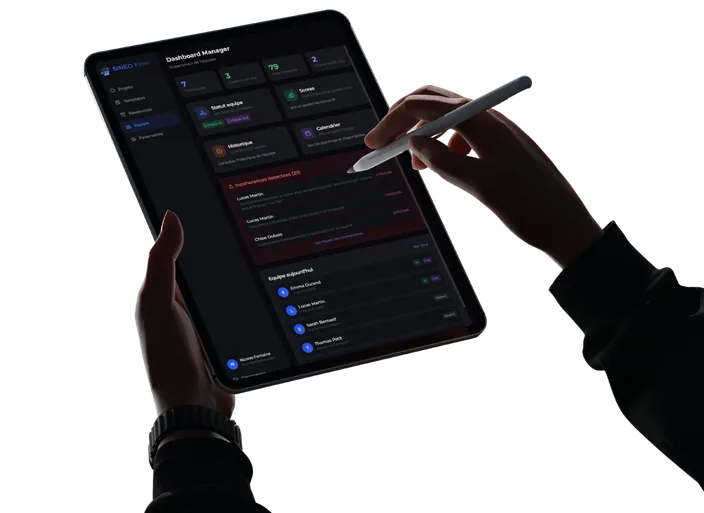
It is not a side tool: C-Esium built complete business software for Tech-O, designed around the way it works and used every day by every role in the network, from the customer request to payment. Here are its modules and what they do in practice.
| Module | What it does day to day |
|---|---|
| Customer (CRM) and request management | Every request is recorded and linked to the right customer and the right address. The history by address and the global search find any case. |
| Quotes and invoicing, with automatic reminders for unpaid invoices | Quotes sent are tracked, with their statistics. Invoices, payments and unpaid invoices are tracked in the same tool, and reminders for unpaid invoices go out automatically. |
| Accounting synchronised both ways with Pennylane | Invoices and payments flow between the software and Pennylane, both ways: what is entered on one side is up to date on the other, with no re-keying. |
| Invoice triggered automatically by the job report | As soon as the job report is approved, the invoice is triggered with no re-keying, then goes to Pennylane. Reports not yet done stay visible at head office. |
| Payroll inputs: hours and data passed on for payroll | Hours and the data needed for payroll are gathered in the software, then passed on for payroll. |
| Customer communication by built-in SMS and email | SMS and emails to customers are sent from the software, with no separate messaging tool: for example, the SMS that confirms the job appointment. |
| Team calendar synchronised both ways with Google Calendar | A job scheduled in the software appears in Google Calendar, and an appointment created in Google Calendar appears in the software. Scheduling also sees unassigned jobs and upcoming visits. |
| Custom documents and PDF reports generated automatically | Documents and reports are produced as PDFs from the case data, with no copy and paste and no manual layout. |
| Job reports written by AI from voice notes | The technician dictates the findings in a voice note; AI writes most of the report, linked to the job, the customer and the address. |
| Data you can query from Claude or ChatGPT (read-only MCP connector) | Management asks its questions in plain language: unpaid invoices, unassigned jobs, cash position. About 35 tools, all read-only; only authorised users have access and access is logged. |
Who uses it, and for what
Sales
Scheduling
Technicians
Head office and management
Accounting
Integrations
How is AI used, in practice?
AI is not a separate module: it is plugged into the journey of the job. The most visible case runs from the technician’s voice note to the invoice.
- Step 1
Voice note
At the end of the job, the technician dictates the findings in a voice note.
- Step 2
Report written by AI
AI writes most of the job report from the note. The report is linked to the job, the customer and the address.
- Step 3
Invoice triggered
Once the job report is approved, the invoice is triggered automatically.
- Step 4
Accounting and follow-up
The invoice goes to Pennylane; payments and unpaid invoices are tracked in the same tool, synchronised both ways.
Because the invoice depends on the job report, the report is not an administrative formality: it is the step that triggers revenue. And reports not yet done are visible in head office reporting.
How does management query its data from Claude or ChatGPT?
Tech-O’s software has an MCP connector in production. MCP (Model Context Protocol) is an open standard that lets AI applications such as Claude or ChatGPT connect to external systems (official MCP documentation, accessed 4 October 2026). Tech-O’s connector exposes about 35 tools, all read-only.
| Family | Tools | Example question |
|---|---|---|
| Management | Dashboard, recent activity, alerts | “What needs my attention today?” |
| Jobs and scheduling | Today’s jobs, unassigned jobs, upcoming visits | “Which jobs are not assigned to anyone yet?” |
| Reports | Job reports not done | “Which job reports are still missing?” |
| Quotes | Quotes, quote statistics | “Which quotes have been waiting for an answer for more than 15 days?” |
| Invoicing and collections | Invoices, unpaid invoices, payments, customers with unpaid invoices | “Which customers have unpaid invoices?” |
| Cash and activity | Cash position, revenue trend | “How is revenue changing this quarter?” |
| Search and history | Global search, history by address | “What have we already done at this address?” |
What results for Tech-O?
More than 3,000 hours saved per year, 30% operational gains, 20% fewer human errors (estimates made by C-Esium with Tech-O).
This is an estimate built by C-Esium with the company, not an independent audit.
What does this project show for other companies?
What matters is not leak detection, but the situation: several branches, field teams, a case that changes hands. That situation is found elsewhere too.
Services
Construction
Industry
Outside Tech-O, these are not published references: every project starts from an assessment of your organisation, on site or by video, not from a copy of what was done elsewhere. Are your processes standard and your budget below AED 200,000? Off-the-shelf software will probably suit you better; to fill one specific gap, a focused project starts from AED 40,000. All case studies.
Frequently asked questions
What exactly does Tech-O’s software do?
Tech-O’s software is complete business software built by C-Esium, not a side tool. It brings together: customer (CRM) and request management; quotes and invoicing, with automatic reminders for unpaid invoices; accounting synchronised both ways with Pennylane; invoice triggered automatically by the job report; payroll inputs: hours and data passed on for payroll; customer communication by built-in SMS and email; team calendar synchronised both ways with Google Calendar; custom documents and PDF reports generated automatically; job reports written by AI from voice notes; data you can query from Claude or ChatGPT (read-only MCP connector). Sales, scheduling, technicians, head office and accounting work in it every day, from the customer request to payment.
Does Tech-O own its software?
Yes. Tech-O owns its software: its contract assigns to it all rights to the code. That is the rule for every C-Esium client: the client owns its software: C-Esium assigns to it by contract all rights to the project code — including the building blocks we reuse from one project to the next — together with the database and the documentation. No per-user licence, no dependence on a software vendor. The code is placed in a Git repository (GitHub or GitLab) in the client’s name, at the latest on delivery. A C-Esium client can therefore evolve its software with C-Esium, with another provider or in-house.
How much time does Tech-O save with its internal software?
More than 3,000 hours per year, according to an estimate made by C-Esium with Tech-O. The same estimate shows 30% operational gains and 20% fewer human errors.
How does AI write job reports at Tech-O?
The technician dictates the findings in a voice note and AI writes most of the job report from that note, inside the internal software built by C-Esium. Once the job report is approved, the invoice is triggered automatically.
Can Tech-O’s management query its data from Claude or ChatGPT?
Yes. An MCP connector in production exposes about 35 read-only tools: dashboard, alerts, today’s and unassigned jobs, reports not done, quotes, unpaid invoices, cash position, revenue trend, history by address. The assistant cannot change anything, only authorised users have access and access is logged.
Does this kind of software suit a company that does not do leak detection?
Yes, if its situation looks like Tech-O’s: several branches or sites, field teams, and a request, quote, job, invoice journey that goes through several departments. C-Esium works with SMEs and mid-sized companies in every sector, from AED 200,000 for a complete internal software (from AED 40,000 for a focused project); every project starts from an assessment of your organisation, not from a copy of Tech-O.
Does your organisation look like Tech-O’s?
30 minutes to understand how your cases move, your tools and what internal software with AI would change for you. Free, with no commitment.